
How to Publish a Real Estate Agency's Inventory Without Typing Each Property: CSV and WASI
A guide for real estate agencies and agents: how to build the CSV column by column, upload it, take down sold listings, and request the connection with WASI without retyping each property.

IDIOMA DEL ARTÍCULO
Showing original language
Quick answer: if your inventory lives in Excel or other software, upload it by CSV at colombiamove.com/importar/masivo. If you already manage it in WASI, request the connection and let sold properties close automatically. In both cases, publishing is free and has no commission.
You've already entered each property once: the price, the area, the estrato, the photos. Copying it again listing by listing on another channel is wasted work, and it's what keeps many small agencies stuck on a single portal. This guide is the concrete list: what goes in each column, which errors block the file, and how to keep it up to date. It's for those who manage many properties; if you only have one, the regular form will do.
CSV or WASI? How to choose
Use CSV if your inventory is in an Excel sheet, in Google Sheets, or in other software. Use WASI if your account is already there and you want a property marked as sold, rented, or inactive to close here without you touching anything. Quick note: they're not mutually exclusive, but it's best to pick one source of truth so you don't end up fighting two versions of the same price.
The case of an agency that connected through WASI is already covered in this synchronization guide. And if you also upload vehicles with the same type of file, check the bulk import overview. Here we stay with the property file.
Building the file: one row, one property
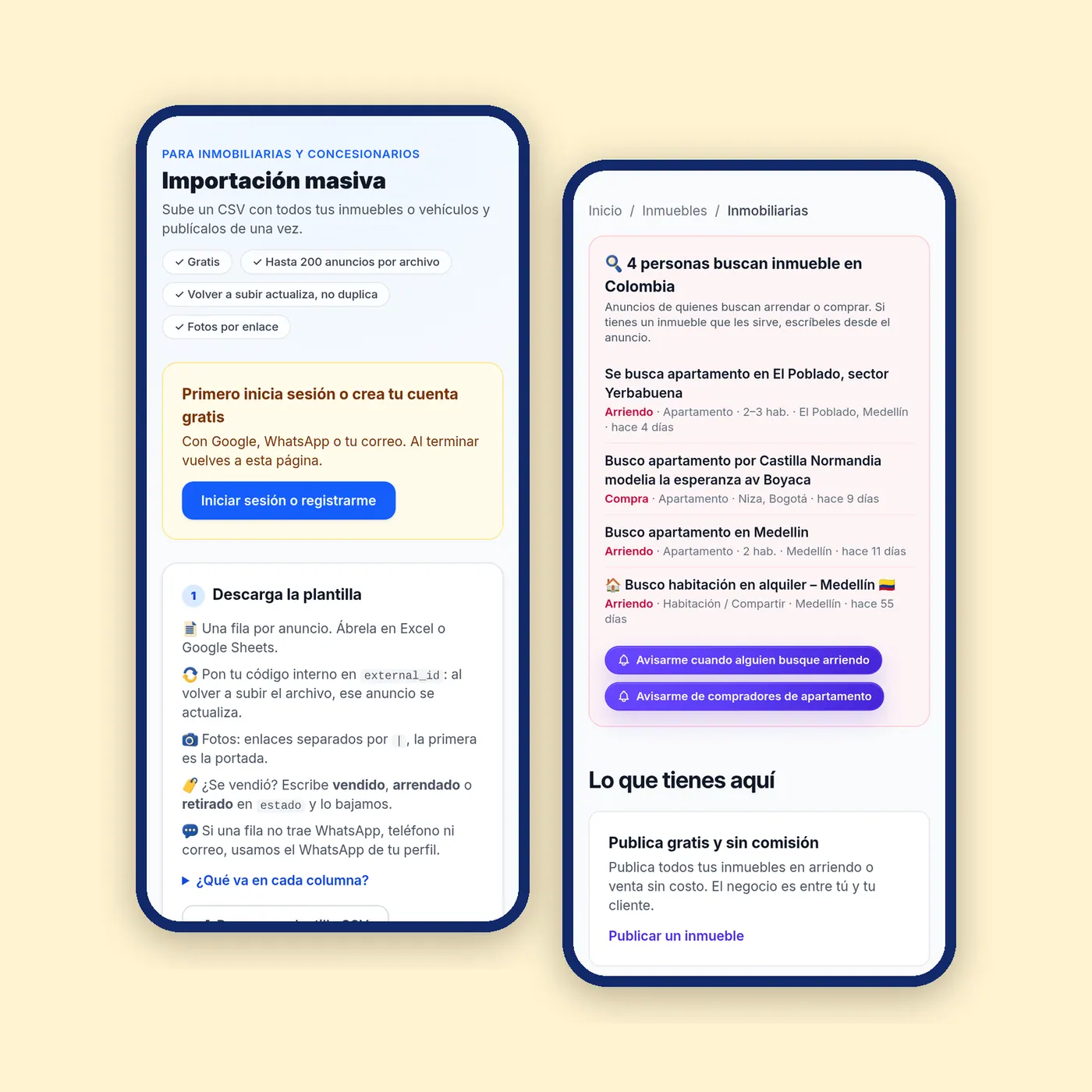
The template can be downloaded in Excel or Google Sheets from the upload page. If the file you download today differs from what you read here, follow the file. The essentials:
- external_id: your internal code. If you upload the file again, that row updates the listing instead of duplicating it.
- Required: tipo (sale or rent), categoria, titulo and descripcion, plus the location column the template indicates.
- precio: in pesos, with or without dots. The template example uses the format 450.000.000; it's a format, not an appraisal.
- Property fields: those listed in the template, including habitaciones, banos, area, estrato, administracion, parqueaderos, piso, ano_construccion, amoblado (si, semi or no), proyecto (nuevo, sobre planos or vacío) and vis (vis or vip).
- Contact: whatsapp, telefono and email. If the row doesn't include any, the WhatsApp from the profile is used.
- fotos: public links separated by
|; the first one is the cover. - estado: vendido, arrendado or retirado to take the listing down.
Each row should be able to hold the data a buyer asks for first; the checklist for publishing a property helps you review what can't be missing. And since photos go in as links, choose carefully the one that opens the row: the photo guide explains how to take them.
Errors that block the file
- Rows without
external_id: you won't be able to update them later without duplicating. - Saving in a format that is not CSV UTF-8 (in Excel, "CSV UTF-8"; in Google Sheets, File → Download → CSV).
- Going over 200 rows or 2 MB per file. Split the inventory into several files.
- Putting something in fotos that is not a public link.
- Leaving as first photo one that is not the cover.
- Writing in
estadoa word other than vendido, arrendado or retirado. - Inventing a category that the template doesn't include.
Uploading and confirming
Bulk upload is enabled per account: you request access from the upload page and, once enabled, you upload the CSV. Review what the validation shows and confirm; nothing is published until you confirm. It's the calm part of the process: if you see a bad row, you fix the file and upload it again.
One thing that is worth doing: test first with five or ten rows. It's faster to notice that the photo column came out with spaces than to discover it across 200 listings.
Keeping the inventory and taking down what's sold
A listing for an already sold property that stays online is what most quickly erodes the trust of the interested buyer. Two ways to avoid it: in CSV, write vendido, arrendado or retirado in estado and upload again; with WASI, mark the property as sold, rented, or inactive in your CRM and the closure arrives here. To change a price, repeat the same external_id and upload the file again.
That said, the WASI connection is not instantaneous and replicates what you have there, so a bad listing in WASI gets published bad.
Requesting the WASI connection
Colombia Move needs two pieces of data from your WASI account: the company id and the token. You find them in WASI, under Configuración > Ajustes generales > Conexión con API de Wasi, and they are sent only once from your account's real estate kit. Your WASI password is not requested, and don't paste the token in comments, public chats, or emails. We review a first reading and activate the connection.
According to the real estate agencies page, as of November 16, 2026 the system publishes, updates, and removes listings several times a day. The channel is not exclusive: FincaRaíz or Metrocuadrado are still configured separately, within WASI and with each portal's credentials.
Keep reading: brokerage contract and commissions. The phrase "no commission" from Colombia Move refers to the marketplace, not to the agreement between you and the owner.
What's ready in your account
With the inventory loaded, you can have a showcase with your brand and a one-line code widget to display your active properties on your own site. Interested buyers can download CSV files; they write through the platform or to the account's WhatsApp, and they can request visits at times you offer, at no cost per contact. Each listing is shown in Spanish and English, with the price compared to similar properties in the area, including the price per m², and its history.
If you add the NIT to the profile, the account is presented as a company and that NIT can be verified within Colombia Move. Note: it is not a license from a superintendency nor a guarantee against fraud. To see how rural inventory is displayed, look at fincas, lotes, casas campestres or the entire housing section.
The Plan Agencia is optional: as of November 16, 2026, it costs $199.000 COP and highlights up to 10 properties for 30 days, only in accounts with 5 or more active properties.
Checklist before uploading
- One row per property and one
external_idof your own in all of them. - File in CSV UTF-8, maximum 200 rows and 2 MB.
- Required fields complete: tipo, categoria, titulo, descripcion and the location.
- Photos as public links with
|, cover first. - Closed values written correctly: amoblado, proyecto, vis, estado.
- WhatsApp in the row or in the profile.
- Test with a few rows and confirm only when the validation is clean.
Frequently asked questions
❓ How much does it cost to publish the agency's inventory?
Publishing is free and there is no commission for rentals or sales. The Plan Agencia is optional: as of November 16, 2026, it costs $199.000 COP to highlight up to 10 properties for 30 days, in accounts with 5 or more active ones (verify on the official source).
❓ How many properties fit in one file?
Up to 200 rows and 2 MB per file. If you have more, you split them into several files. Nothing goes online until you confirm, and access to bulk upload is requested per account (verify on the official source).
❓ How do I change a price without duplicating the listing?
The same row must always carry the same external_id. When you upload the file again, that row updates the listing instead of creating another, so don't delete or change that code.
❓ How do I remove a property that has already been sold or rented?
In the CSV, write vendido, arrendado or retirado in estado and upload again. If the source is WASI, marking it sold, rented, or inactive there also closes it here, in a later pass and not instantly.
❓ Where do I request the WASI connection?
From the real estate kit in your account, by sending the company id and the token you see in WASI, under Configuración > Ajustes generales > Conexión con API de Wasi. Never send your WASI password.
❓ Does connecting WASI force me to leave FincaRaíz or Metrocuadrado?
No, Colombia Move is one more channel and does not require exclusivity. Those portals are configured in WASI with each one's credentials; this connection only uses the company id and the token, sent from the kit (verify on the official source).
❓ How do I sell with confidence if the buyer doesn't know my agency?
Complete your profile with your NIT, which can be verified within Colombia Move, and keep listings up to date with estado. The NIT helps present you as a company, but it is not a state certificate or a guarantee against fraud (verify on the official source).

Comments
Loading comments...
Checking sign-in status...