
How to Know How Long Until Your TransMilenio or SITP Arrives, Live
A step-by-step guide to see how long until your TransMilenio or SITP arrives on your phone, understand the difference between En vivo and Horario, and know when the countdown might fail.
IDIOMA DEL ARTÍCULO
Showing original language
You're on the platform, you see a bus that isn't yours go by, and you ask yourself the usual question: how long until mine arrives? To answer it from your phone, with no account and without downloading anything, you can open Chiva, Colombia Move's free tool for TransMilenio and SITP in Bogotá.
The first thing to understand is that the screen at a stop shows two kinds of rows: Live y Schedule. They don't mean the same thing. If you want to know what Chiva is and what it covers in Medellín, we explain it in the tool announcement; here we go straight to the steps.
Step 1: open the stop you're interested in
Go to colombiamove.com/transporte and type the name of the station or stop. If you don't know what the one on the corner is called, tap "Use my location". According to Chiva's homepage (consulted on November 17, 2026), location is only used to find nearby stops and is not stored. It's optional: you can search manually without giving the browser permission.
Chiva is not an official app of the District. The operator's official app is TransMiApp, which also shows trunk and zonal buses in real time, plus trip planning and TuLlave top-ups. Chiva is an alternative that opens in the browser and reuses the operator's open data.
Step 2: read Live and Schedule
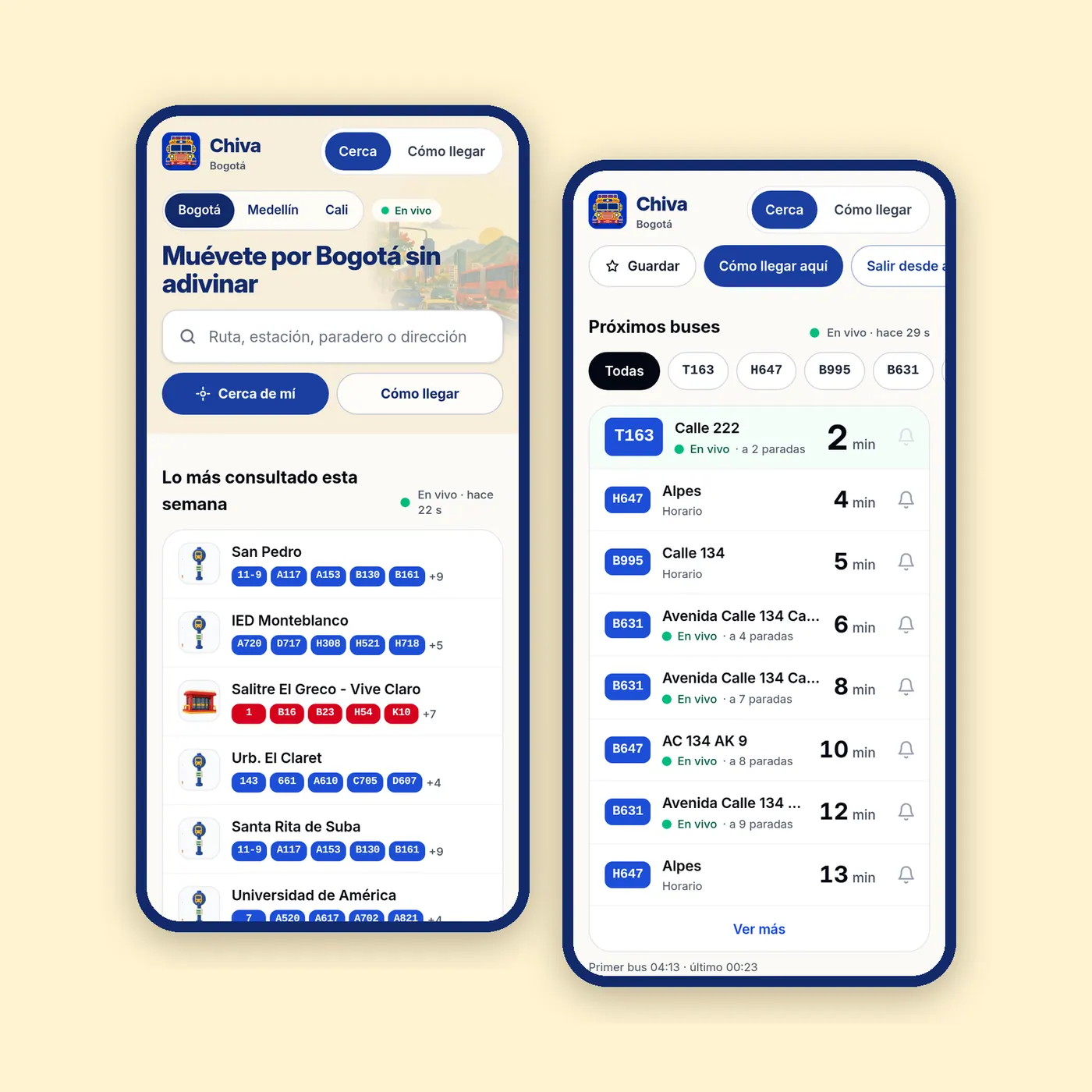
When you open the stop you'll see "Upcoming buses". Each row carries a label:
- Live: the minute comes from locating the bus along its route using the position TransMilenio publishes, and applying the timetable's pace. It's an estimate, not a promise.
- Schedule: is the programmed time. There is no located bus behind that row, so don't treat it as real time.
Then filter by your route code. Watch out for this: the outbound and return routes are separate services, so confirm you're looking at the one going where you're headed. The stop also shows "N stops away", useful for calculating whether you can make it if you run.
When you find the stop you use every day, tap Save. It stays on that same phone, without creating an account. And if something doesn't add up, there's a "Something doesn't add up?" button to report it.
Where the minute comes from and when it fails
TransMilenio publishes open data in GTFS Realtime format, which the operator itself describes as minute-by-minute information. Chiva takes that position and calculates how long is left. The operator does not publish a guarantee of accuracy for the minute shown by a third party, and I won't promise you a margin of error either.
What I can tell you is when to be suspicious:
- There's traffic or a detour: the bus falls behind and the estimate lags.
- The bus stopped reporting its position: without a recent position, the honest thing is to show the schedule.
- The operator's feed went down: it happens, and then everything falls back to Schedule.
My personal rule: if the row says Live, use it to decide whether to run or wait; if it says Schedule, treat it as a guide and have a plan B. If you need the certainty of the official channel, open TransMiApp.
System hours and fare, briefly
According to TransMilenio's homepage (consulted on November 17, 2026), the system operates Monday to Friday from 04:00 to 23:00, Saturdays from 05:00 to 23:00, and Sundays and holidays from 05:00 to 22:00, subject to change. That is the general schedule: each service (express, fácil, dual, feeder) has its own window, often shorter, so your route's hours should be checked on its entry, not in this range.
According to TransMilenio S.A.'s fare page (consulted on November 17, 2026), the fare is $3,550 all day on TransMilenio, TransMiZonal and TransMiCable, and the TuLlave card costs $8,000. The transfer costs $0 only with a personalized TuLlave, within 125 minutes and up to 2 transfers. It does not apply between trunk routes, between dual services, within the same zonal route, at the same stop, or in the TransMilenio–TransMiZonal–TransMilenio sequence. The fare is paid at the operator's turnstile, never inside Chiva. To understand how the system fits together, see this general guide to Bogotá (don't copy its fares: they're outdated).
Medellín: official schedule, not live
There are no live minutes here. The Medellín Metro does not publish the position of its trains, and in Medellín Chiva shows the official schedule. For schedules by line and Cívica fares according to your profile, the current source is the Metro users page. For lines and transfers you can read the Metro and Metrocable guide, without copying its old fares.
Keep reading: What Chiva is and what it covers in Bogotá and Medellín
Try it on your next trip
Open Chiva, search for your stop and save it. If a time doesn't match what you see on the street, report it from "Something doesn't add up?" on the stop's entry, or tell us what's missing on our contact page. That way the tool improves for everyone.
Frequently asked questions
❓ Are the TransMilenio and SITP minutes in Chiva live?
Only if the row says "Live": that minute comes from the position TransMilenio publishes and can shift with traffic. If it says "Schedule", it's the programmed time and not a located bus. Don't take it as a promise of arrival.
❓ What time does the SITP run if no live bus appears?
Use the "Schedule" row for your route on the stop's entry, not the general system schedule. Each service has its own window, often shorter than the system's, and it can change (check the official source).
❓ Is the Medellín Metro also live?
No. The Medellín Metro does not publish the position of its trains, so Chiva shows the official schedule there. For current schedules and fares, check the Metro users page (check the official source).
❓ How much is the fare in Bogotá?
$3,550 all day on trunk, zonal and TransMiCable, according to TransMilenio's fare page consulted on November 17, 2026. The $0 transfer requires a personalized TuLlave, lasts 125 minutes and allows up to two, with exclusions (check the official source).
❓ Is Chiva TransMilenio's official app?
No. The official app is TransMiApp. Chiva is a Colombia Move tool that opens in the browser, is free, requires no account and reuses the operator's open data.
❓ Why doesn't the minute always match the bus?
Because it's an estimate made from the bus's last position and the timetable's pace. A traffic jam, a detour or a bus that stopped reporting can shift it, and without a position the only thing left to show is the schedule.
❓ Do I have to download anything or create an account?
No. You open colombiamove.com/transporte on your phone and that's it. The Save button keeps your stop on that same device, with no registration. Location is optional and, according to Chiva's homepage, is not stored.





Comments
Loading comments...
Checking sign-in status...